
Setting a song's start and end points
The Waveform Editor lets you set where a song starts and where it ends — visually, by dragging on the audio. Useful for trimming silence at the head or tail without re-rendering the audio file.
Setting the song's start
The song's start point is its first locator cue. Move that locator to wherever you want playback to begin when the song loads.
- Open the song.
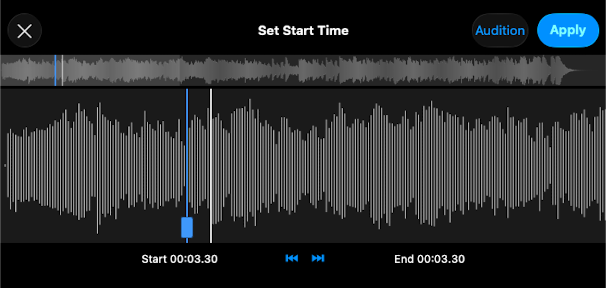
- Open the first locator cue and tap Set Start Time in Waveform....
- Drag the position handle on the waveform to the moment you want playback to begin. Use Audition to preview.
- Tap Apply, then Save.
Setting the song's end
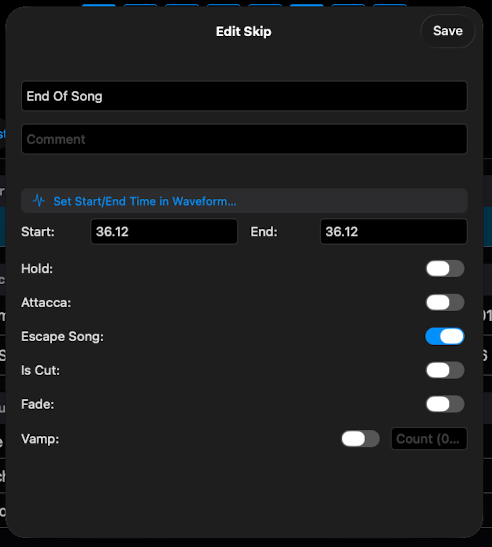
The song's end point is set with an Escape Song event — a Skip-typed event with the Escape Song toggle on. Only the Start Time of the event is relevant; the End Time is ignored.
- Add a new Skip event in the song's event list (or open an existing one).
- Toggle Escape Song on.
- Tap Set Start/End Time in Waveform... and drag the start cursor to the moment you want the song to stop.
- Apply, then Save.
If you want the next song to auto-play instead of waiting for GO, use an Attacca event in the same way — it both ends the current song and auto-plays the next one.
Notes
- The audio file is unchanged. ShowPlayer just respects the start and end points you've set. The original file stays the same.
- Trim silence aggressively. A few seconds of silence at the head adds up across a show. Setting the start a beat or two before the first downbeat keeps pickups tight.
- End early when needed. If the recording has a long fade-out you don't want, place an Escape Song where the song should button.
- Escape Song vs Attacca. Both end the song and advance to the next playlist item. Use Attacca when the next song should auto-play immediately. Escape Song will wait for the operator to start the next song or scene. s