
Conductor cues
Conductor cues change how the timeline flows during a song so playback can follow what's happening on stage. Each one has a start time and an end time on the audio timeline.
Internally, all conductor cues use a single data model: Skip. The base Skip is just a time window where GO AHEAD becomes available. The other sub-types — Hold, Cut, Vamp, Escape Song, Attacca — extend this base by adding a specific timeline behavior on top. The naming has a slight overlap: the model is called Skip, and one of the sub-types is also called Skip (the "pure" case, with no extra behavior). When this article uses Skip by itself, it means the sub-type.
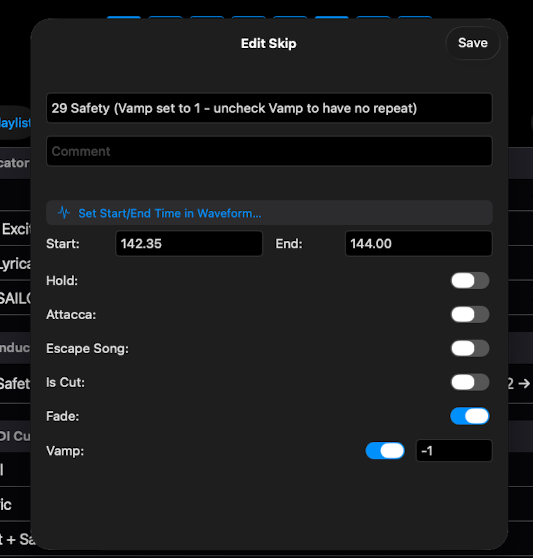
The six sub-types
- Skip — a time range where the GO AHEAD button becomes available. Playback runs through the range normally; the operator can tap GO AHEAD to jump to the end if needed. Useful for optional cuts (a verse you might skip if running long) or for syncing the music to a performer who's moving faster than the audio.
- Hold — pauses playback 1 second after the Skip start time. Tap CONTINUE (the GO button) to resume — playback continues from the end of the Skip window, not from the pause point. Use to wait for an actor's line, a sight gag, an applause break.
- Cut — end the song at this point. Use when a song needs to button early because of staging or a director's call.
- Vamp — loop between the start and end times. Tap DEVAMP to exit the loop and continue. Use to give the cast time to finish staging during an instrumental section.
- Escape Song — sets the end of the song at the Skip's Start Time. ShowPlayer stops playback there even if there's audio after. Only the Start Time is relevant; the End Time is ignored. Use the Waveform Editor for precise placement.
- Attacca — also sets where the song ends (at the Skip's Start Time), and additionally advances to the next song automatically without waiting for GO. Use for medleys, scene-change underscores that flow into the next number, anywhere a pause would break the moment.
Notes
- Disable Cut, Vamp, or Hold by toggling off. Turn off the Cut, Vamp, or Hold toggle in the event editor and the event becomes a regular Skip — playback proceeds normally and the GO AHEAD button stays available during the event window. Useful when a director changes their mind during tech.
- Fade toggle. Skip events have a Fade toggle that crossfades the audio at the continuation point (skip.end) to smooth the timeline jump. Use it when audio doesn't reach silence before the continuation — the crossfade hides the cut. Avoid it when the continuation has a clean entrance — the crossfade can muddy it. (Distinct from the Fade payload on MIDI events, which fades overlay audio rather than the main timeline.)
- Editing precision. Use the Waveform Editor to set start and end times with sample-level precision.
- One song can have several. A song can carry multiple conductor cues — a Vamp for the dance break, a Hold for the applause, an Attacca into the next number.